
A VPN can change the route your video call takes across the internet. Sometimes this has little noticeable effect; sometimes a call that worked yesterday suddenly has a delay, frozen pictures or a connection error. The right question is not whether a VPN is always good or bad for video chat, but whether it is useful for your specific connection and privacy needs.
What changes when you turn on a VPN?
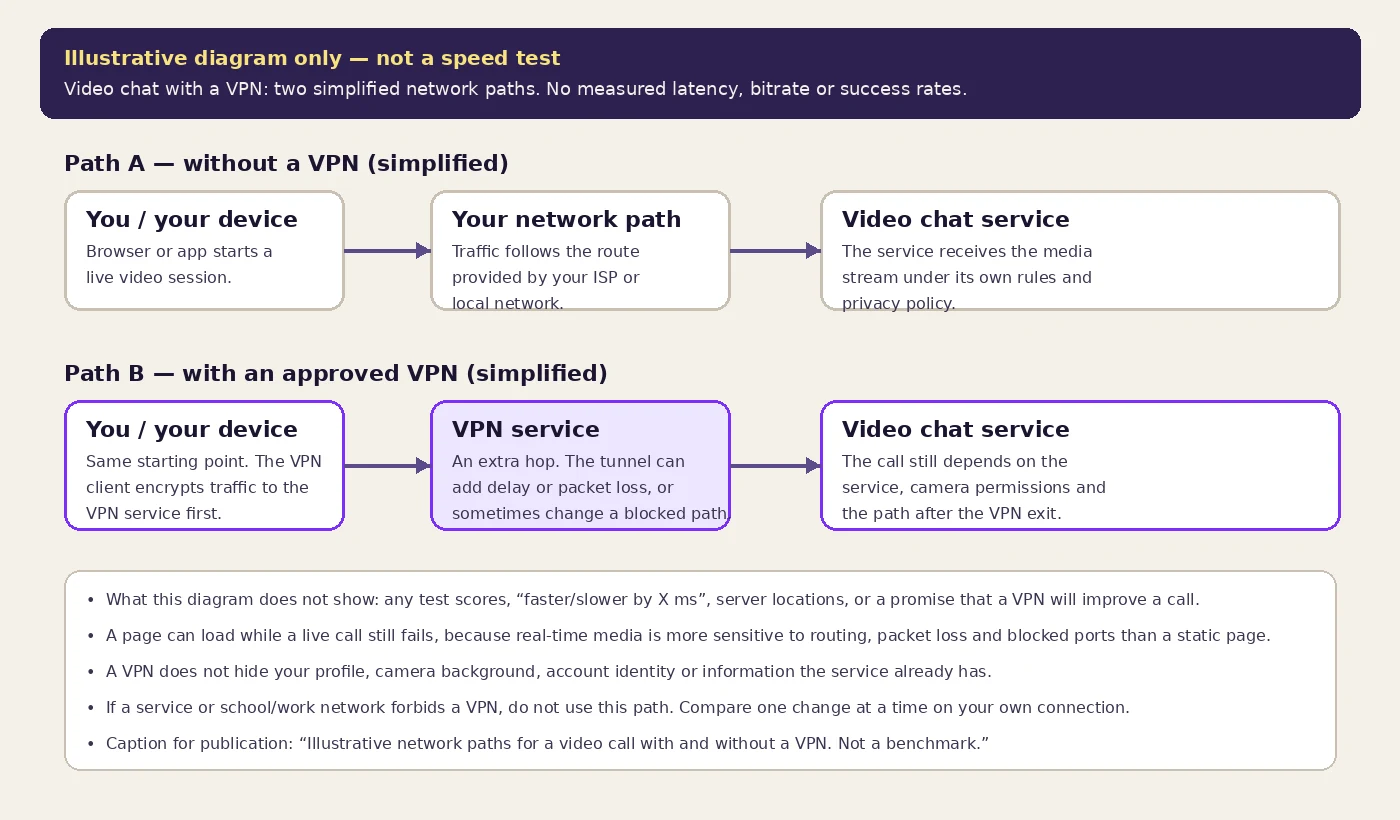
A typical VPN creates an encrypted tunnel between your device and a VPN server. The chat service may see that server's public IP rather than your ordinary public IP. The extra routing step can change latency, available bandwidth and the way a network handles real-time traffic. It does not prevent another participant from seeing your face, recording the screen, or learning information you reveal in conversation. The VPN operator may also see certain network metadata, depending on its design and policy.
| Symptom | Possible explanation |
|---|---|
| Video loads but conversation feels delayed | Additional routing latency or unstable delivery |
| Audio breaks up even though downloads are fast | Jitter or packet loss |
| Call never connects | A network, VPN or service restriction affecting real-time traffic |
| Country suggestions change | IP-based location signal has changed; account preferences may be separate |
| Camera preview is black before connecting | Local permissions or hardware, not necessarily VPN routing |
Make a controlled connection comparison
If using the service is permitted on your network and you can safely test without a VPN, compare the same device, browser, network and approximate time. Keep your camera off during network-only tests where possible. Record whether the page loads, whether the connection completes, and whether audio and video remain stable for a short interval. If you already need a VPN for security, work policy or a sensitive environment, do not disable it just to troubleshoot; use an approved alternative network or contact your administrator.
A useful test is to change only one variable at a time. Trying another browser, moving to mobile data and changing VPN servers all at once makes it difficult to identify the source of the problem. A single speed-test download number is not enough: interactive calls depend on consistent delivery in both directions.
What to do when the service does not connect
Check the provider's rules about VPN access and regional availability. Some services may restrict proxy or VPN connections to manage abuse, payments or local requirements. If access is restricted, use official support; do not attempt to bypass a service ban, identity check or legal restriction.
If the VPN is allowed but performance is poor, try an approved server closer to your actual location, close heavy background downloads, or ask the VPN provider whether real-time communication is supported. If the problem persists on a normal connection, consult our video chat lag and freezing guide for local device and network checks.
Privacy practices that work with or without a VPN
A VPN does not make a social account anonymous. A platform may still know your account identity, device information, purchases and other data described in its policy. Avoid showing documents, addresses or identifying details in the background. Grant camera and microphone access only to the correct website, and use block or report if a conversation becomes uncomfortable.
Kiss Live Chat provides a browser-based option for adults who want to browse profiles before requesting a call. Whether you use a VPN or not, review the privacy and safety guidance and respect the site's access rules. There is no need to pay for a VPN simply to start a conversation.
Conclusion
Use a VPN for a clear privacy or network requirement, not as a guarantee of anonymity or call quality. Compare one variable at a time and respect the service's rules.
Quick answers
FAQ
Does a VPN make video chat faster?
Sometimes a different route can perform better, but the extra tunnel often adds overhead. Test the real call instead of relying on marketing claims.
Can someone identify me if I use a VPN?
They may still learn identifying details from your profile, conversation or camera background. A VPN does not hide everything.
Why does the website work but a call fail?
Loading a web page and exchanging live media use different network behavior. Check permissions, connection restrictions and official support.