
Introduction
Random video chat feels almost instantaneous from the user side: open a site, allow the camera, press Start, and a stranger appears. Behind that simple interaction is a chain of systems that handle device permissions, matchmaking, real-time media, session state, and safety controls.
You do not need to understand networking to use random chat, but knowing the basic flow helps explain why some services start faster than others, why camera permissions matter, what WebRTC does, and why “anonymous” does not necessarily mean the platform handles no technical data.
Quick Answer: What Happens After You Press Start?
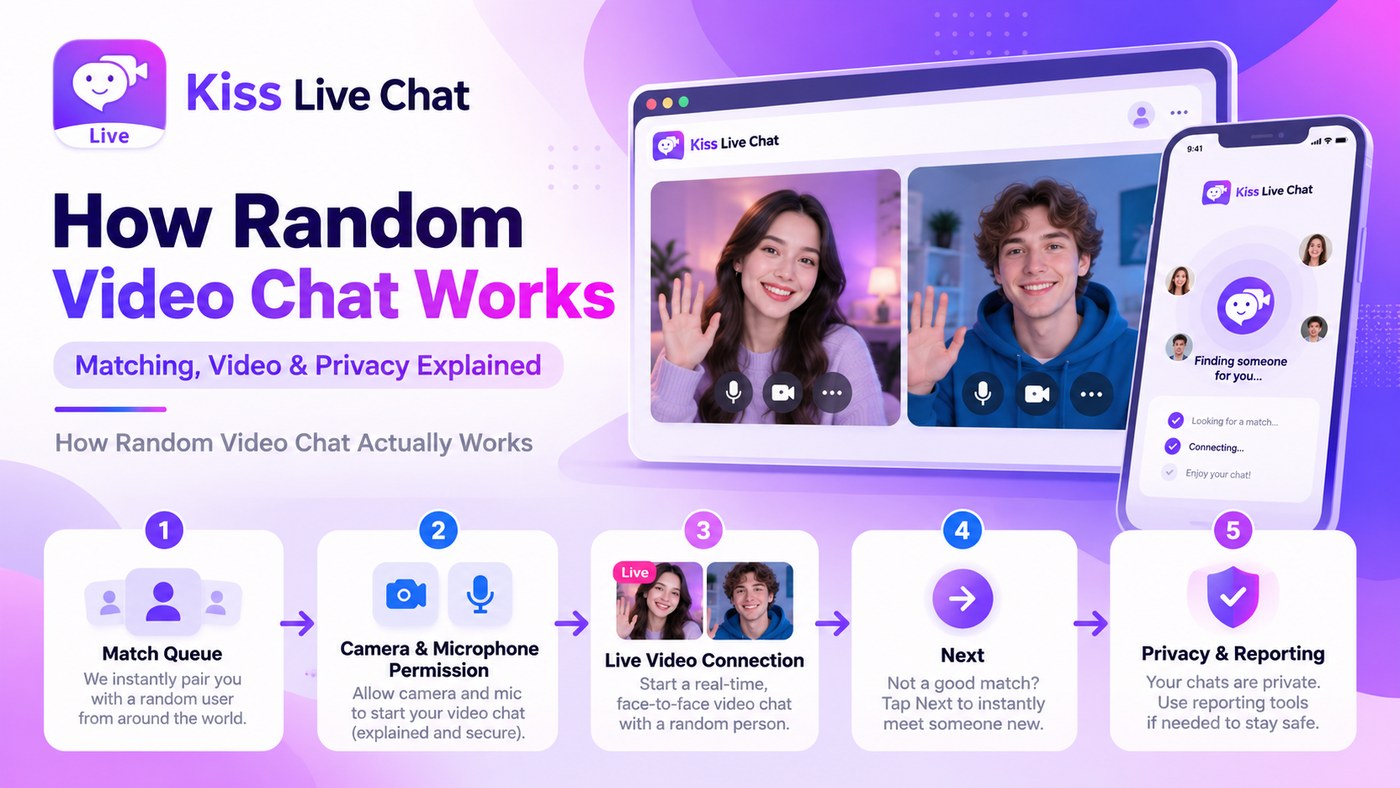
A typical random video chat session has five stages: your device grants access to the camera and microphone, the service places you in a matchmaking queue, the matching system finds another available user, the platform establishes a real-time audio/video session, and both users remain connected until one leaves or presses Next.
The exact technical architecture varies by product. Some services use direct peer-to-peer media paths where possible, while others rely on relay or media infrastructure for reliability, moderation, or network compatibility. That is why broad claims such as “all random chat is purely peer-to-peer” are too simplistic.
Step 1: Camera and Microphone Permissions
Modern browsers and mobile operating systems control access to the camera and microphone. A website cannot simply turn them on silently; it needs permission through the browser or device interface.
When you approve camera and microphone access, the browser creates media streams that the chat application can use. If you deny permission, the service may offer text-only use, show a setup error, or explain how to change the setting later.
A trustworthy interface should request only what the feature needs and explain errors clearly. If a basic video chat asks for unrelated permissions without an obvious reason, that is worth questioning.
Step 2: The Matchmaking Queue
After you press Start, the service needs another available user. The simplest matching system pairs two people from the same general queue, while more complex systems may consider language, country, interest tags, subscription filters, or other preferences.
The size and distribution of the active user pool affect wait time. A service with many users online in your preferred region or language can match faster than one with a smaller or more fragmented audience.
Filters can increase relevance but also reduce the pool. That is why highly specific preferences sometimes increase wait time or become premium features.
Step 3: Establishing the Video Connection
Many browser-based video applications use WebRTC, a set of technologies designed for real-time audio, video, and data communication in modern browsers and apps. WebRTC handles media capture, codec negotiation, network traversal, and the real-time exchange of audio and video.
The media path is not identical across every service. Depending on the product and network conditions, traffic may travel directly between users or through relay/media infrastructure. Services may also integrate separate systems for moderation, analytics, or quality management.
The user does not normally need to know which route is used, but the distinction matters when evaluating privacy claims. Look for the platform’s own technical and privacy documentation rather than assuming every WebRTC product behaves the same way.
Step 4: The Live Session
Once the session is established, both users receive live audio and video. The interface may also support text chat, mute, camera toggles, filters, translation, reactions, or other optional features.
The most important control in random chat is usually Next or Skip. Pressing it tells the service to end the current session and return you to matchmaking. A clean implementation should disconnect the previous conversation before beginning the next one.
This fast session turnover is what makes random chat feel fundamentally different from scheduled video calling. The product is built around discovery and replacement rather than contacting someone you already know.
Step 5: Skip, Report, Block, and Moderation
Skip and report are not the same action. Skip simply ends the interaction and moves you on, while report signals that the other user may have violated the platform’s rules. Some systems also support blocking persistent identities or devices where the product architecture makes that possible.
Moderation can be reactive, proactive, or mixed. Reactive systems review user reports after something happens, while proactive systems may use automated detection, human review, age controls, or combinations of those approaches.
No system removes all risk. The useful question is whether the product makes leaving and reporting fast enough that users do not need to stay in a bad interaction.
What Does “Anonymous” Mean Technically?
Anonymous usually means the other person does not automatically receive a complete real-world identity. You may be able to start with no public profile, no real name, or no persistent username.
That does not mean the platform processes no information. Session operation, security, abuse prevention, analytics, or payments may involve technical data such as IP address, browser information, session identifiers, or cookies.
If privacy matters to you, read the service’s policy and treat marketing language as a starting point rather than a technical guarantee. Terms such as “anonymous,” “private,” and “peer-to-peer” should be understood through the product’s actual documentation.
Why Random Video Chat Sometimes Lags or Disconnects
Live video depends on both users’ network quality, device performance, browser behavior, and the infrastructure connecting them. A weak Wi-Fi connection, congested mobile data, high latency, or a device under heavy load can cause frozen video, delayed audio, or drops.
Browser permissions can also create problems if the camera is already being used by another application. On mobile, backgrounding the browser or switching networks can interrupt a session depending on the platform.
If a service consistently feels unstable across strong networks and multiple devices, the problem may be the platform rather than your connection.
Browser vs App Architecture
Browser-based services reduce installation friction because the browser already provides access to camera, microphone, and networking capabilities. Native apps can integrate more deeply with the device, support notifications, and maintain persistent settings more easily.
For the user, the best choice depends on frequency. Occasional users may prefer browser-based video chat, while frequent mobile users may prefer an app if it provides a smoother experience.
The underlying goal is the same: create a live session quickly enough that the technology disappears behind the conversation. Whether the user arrives through a browser or an app, technical complexity should not dominate the experience.
How Kiss Fits Into This Flow
Kiss should be evaluated on the same sequence: how quickly a user reaches the first conversation, how clearly camera and microphone access is handled, what the matching loop feels like, and how the product supports leaving or reporting when necessary. The technology matters only insofar as it produces a smooth, understandable user experience.
For most users, the system is successful when they do not need to think about WebRTC, queues, relays, or session state at all. Those systems matter because they support reliability, privacy, and moderation, but they should remain largely invisible during a normal conversation.
Conclusion
Random video chat works by combining device permissions, matchmaking, real-time media technology, and session controls into a very short user journey. You allow the camera and microphone, enter a queue, get matched, connect, and leave or move on when the interaction ends.
The technical details vary from platform to platform, especially around media routing, moderation, and data handling. The useful standard is therefore not a single architecture claim; it is whether the service starts reliably, explains permissions clearly, protects basic safety controls, and keeps the technology out of the way of the conversation.