What "webcam chat" means today
Webcam chat with strangers means a live video conversation, usually one-to-one, with someone you are matched with rather than someone you already know. The term comes from the desktop era, when you needed a webcam clipped to a monitor. Today the same sites work on phones, but the desktop experience still has real advantages: a stable image, a large screen and a proper keyboard for text chat.
If you want to understand the two-way format itself, read cam-to-cam video chat explained. This guide focuses on doing it well from a computer.
Built-in or external webcam?
| Built-in laptop webcam | External USB webcam | |
|---|---|---|
| Setup | Nothing to do | Plug in, choose it in the browser |
| Image | Often 720p, struggles in low light | Often 1080p, better in low light |
| Angle | Looks up at you unless the laptop is raised | Sits on the monitor at eye level |
| Microphone | Built in, picks up keyboard noise | Many include one; headphones still help |
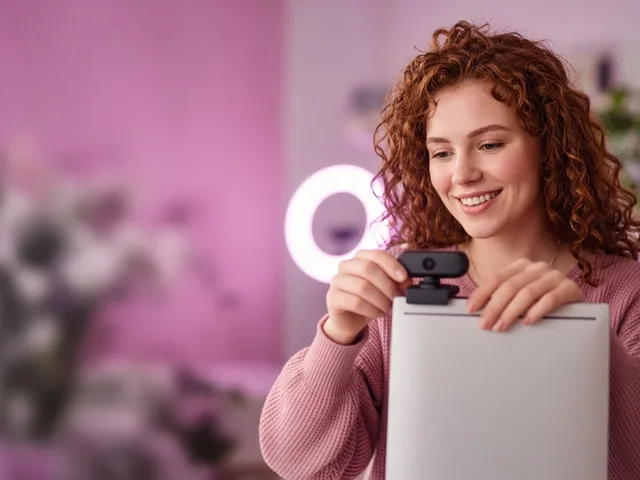
You do not need an expensive camera. A modest 1080p webcam and good light beat a premium camera in a dark room. If you use an external camera, select it in the site's permission settings next to the address bar so the browser does not default to the built-in one.
Framing, light and sound in five minutes
- Light in front of you. Sit facing a window by day or put a lamp behind the screen at night. A small ring light is an easy upgrade.
- Camera at eye level. Raise a laptop on books; tilt a USB webcam slightly down.
- Head and shoulders in frame. Leave a little space above your head. Too close feels intense, too far feels distant.
- Clean background. Remove anything personal: mail, badges, family photos, a view that shows your street.
- Headphones on. They stop echo and keyboard clatter reaching the other person.
For more, see how to look good on video chat.
How to pick a webcam chat site
Webcam chat sites differ more than their homepages suggest. Compare them on:
- Desktop support: does it run fully in a desktop browser, or push you to an app?
- Start rules: guest start, free account, or full registration?
- Filters: language and country filters reduce skipping. Check which are free.
- Moderation: published rules, report and block tools and an 18+ policy.
- Costs: what happens after the first minutes or first calls.
Our cam chat page and video chat with strangers overview compare approaches.
Webcam settings worth a minute
- Resolution: most chat sites adapt automatically. If your image looks soft, check the site uses your best camera and that your connection is not the bottleneck.
- Exposure and white balance: many webcams ship with software that lets you fix a too-dark or too-orange image. Set it once, then close the software so it does not hold the camera.
- Mirror view: your preview may be mirrored; the other person sees the correct orientation.
- Background blur: Windows Studio Effects on some laptops and macOS video effects can blur your background in any browser, a quick privacy upgrade.
Privacy habits for webcam chat
- Share less than you think. First name only, no address, school, workplace or social handles in a first chat.
- Assume screens can be recorded. Another person can capture their screen with external tools.
- Do not click links from strangers or download files they send.
- Use the cover. A webcam cover or the laptop's privacy shutter gives you peace of mind when you are not chatting.
- Revoke permissions for sites you no longer use: browser settings → Site settings → Camera.
- Leave fast. If someone makes you uncomfortable, skip, report and block. You owe no one an explanation.
Make the first 30 seconds count
Most webcam chats are decided quickly. Make it easy for the other person to stay:
- Look at the camera, not the screen, when you say hello.
- Open with something visible or specific: "Is that a guitar behind you?" or "Where are you calling from?"
- Keep the first exchange light. Big personal questions can wait.
- If you are shy, see video chat tips for shy people.
Webcam chat dos and don'ts
| Do | Don't |
|---|---|
| Show your face and say hello | Start with the camera pointed at the ceiling |
| Ask open questions | Interview people with yes/no questions |
| Skip politely when it is not clicking | Argue with someone who is rude; report and move on |
| Keep the first chat light | Share your address, school or workplace |
| Use text chat for names or spellings | Click links or files a stranger sends |
How to make the first minute count
Random chats are decided quickly. A few small habits help conversations last longer than a skip:
- Smile and say hi first. Silence is the most common reason people click Next.
- Mention something visible or easy: where you are, the time of day, a language you speak.
- Ask one open question, such as what brought them online tonight.
- If it is not clicking, end kindly. "Nice to meet you, good luck!" beats a silent skip.
For more ideas, see first video chat conversation topics.
Webcam chat on Kiss
Kiss is random 1-on-1 video chat that works in your desktop browser and on your phone. On a computer, open kisschat.live, choose Visitor, allow your webcam and microphone and press start. Use language and country filters to steer matches, or browse people who are online. Report and block tools are always one click away, and Kiss is strictly for adults 18+. The first minute of each new 1-on-1 call can be free, then calls continue with coins.
Turn on your webcam and try it.
For another desktop-oriented overview of webcam chat, this independent webcam chat guide is a useful cross-check.
Related guide: Free Webcam Chat Rooms vs 1-on-1 Cam Chat: Which Should You Use?

Add Kiss to your home screen
No download needed: the Kiss web app opens full-screen from an icon, like an app.
- Android · Chrome: ⋮ menu → “Install app” or “Add to Home screen”
- iPhone · Safari: Share → “Add to Home Screen”
Prefer the app? Get the iPhone app
Quick answers
FAQ
Is webcam chat with strangers safe?
It is more comfortable when you use sites with clear rules and report tools, keep personal details private, avoid links from strangers and leave any chat that feels wrong.
Do I need an external webcam for webcam chat?
No. A laptop webcam works. An external 1080p webcam at eye level and good front light make the picture noticeably better.
How do I choose which webcam the browser uses?
Click the icon to the left of the address bar, open site settings or permissions and select the camera you want, then reload the page.
Can I webcam chat without creating an account?
Some sites allow a guest start. On Kiss you can choose Visitor at kisschat.live.
What should I hide from my webcam background?
Anything that identifies you or where you live: mail, ID badges, school logos, family photos and windows with a street view.